

Shopify app for delivery times, inventory & pre-orders
Keep selling, even when it is temporarily out of stock.
BackorderPRO reads your supplier feeds, matches them to your Shopify products automatically, and shows delivery times, stock status and pre-order buttons on your product page, in the cart and in the customer account — fully automated.
Free to start · EU-hosted & GDPR-proof · Built by e-commerce entrepreneurs
Sound familiar?
Stores with both in-stock and temporarily out-of-stock products hit the same problems. Here is how BackorderPRO solves them:
Out of stock = lost sale
When a product hits zero, the customer sees “unavailable” and buys elsewhere. You lose the sale even though it is arriving in a few days.
Pre-order button captures the sale
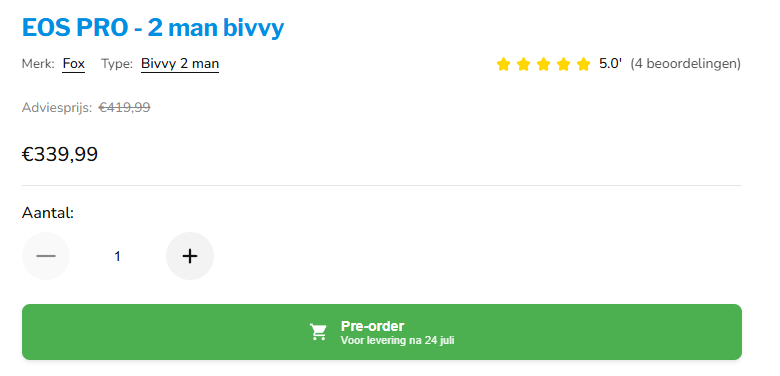
At zero stock, a pre-order button replaces add-to-cart. The customer checks out right away with a clear delivery date — you keep the revenue.
“When will it be back?”
Your inbox fills up with the same question. Every manual reply costs time while the customer keeps hesitating.
Delivery times & restock alerts
A lead-time badge and the exact restock date sit on the product page, and customers get automatic email updates. Fewer questions, more trust.
Tracking stock by hand
A separate spreadsheet per supplier and re-typing on every change. Error-prone and it costs hours every week.
Feed import + auto-match
BackorderPRO reads CSV, Excel or XML feeds via URL or FTP, matches on SKU or EAN and syncs daily. Set it up once, then it runs on its own.
You forget what to reorder
Without an overview, open backorders slip through the cracks. Customers wait too long and you reorder too late.
Backorder Tracker + Buy Advice
Every backorder is logged with a status, and Buy Advice turns it into a ready-made shopping list per supplier. You know exactly what to order.
The difference BackorderPRO makes
From lost sales and manual work to automated backorder handling.
Without BackorderPRO
- “Unavailable” — the customer leaves and buys elsewhere
- Updating stock and delivery times by hand
- Inbox full of “when will it arrive?” emails
- No overview of which backorders to reorder
- Every supplier feed in a separate spreadsheet
With BackorderPRO
- Pre-order keeps the sale, even at 0 stock
- Stock, delivery times and pre-orders update automatically
- Customers see the delivery date themselves — fewer questions
- Tracker + Buy Advice show exactly what to order
- One app reads all your feeds (CSV/Excel/XML, URL/FTP)
See BackorderPRO in action
From storefront to admin — a quick tour of what your customers see and how you stay in control.
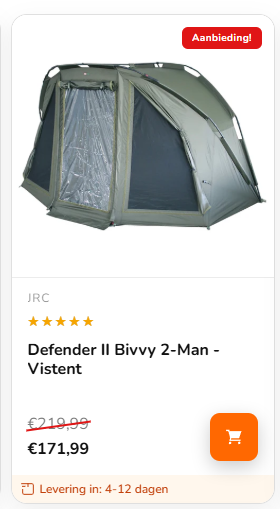
Lead time visible up front
Show a delivery time on the product card as soon as the item is in stock at your supplier — so customers keep buying with confidence.
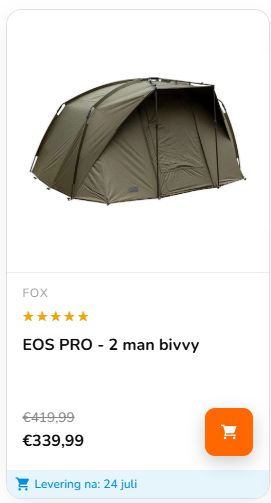
Pre-order with a delivery date
Sold out? The card shows the expected delivery date and lets the customer pre-order right away instead of leaving.
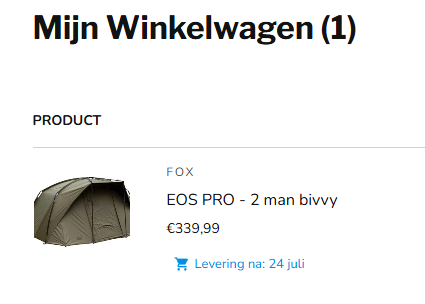
Crystal clear in the cart
The pre-order and expected delivery date stay visible in the cart, so the customer knows exactly what they are ordering.
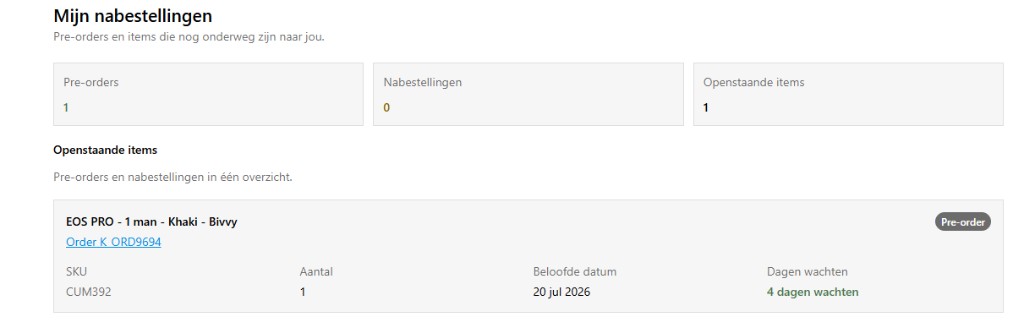
Customers see their own pre-orders
An optional overview in the customer account shows all pre-orders and backorders, expected dates and the order type.
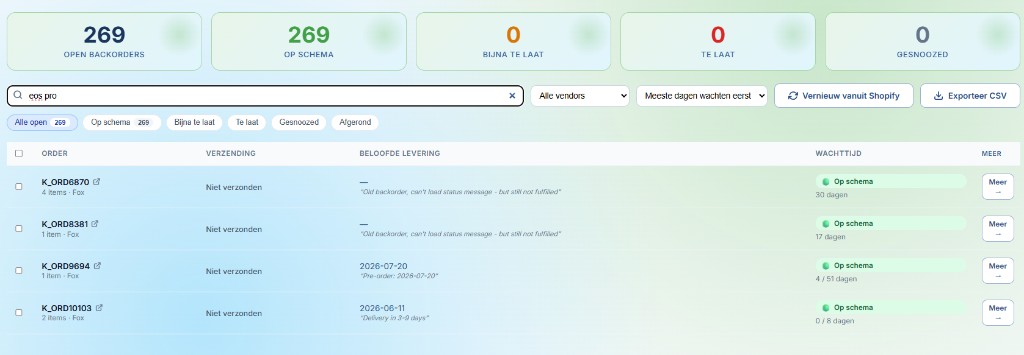
Every backorder on one dashboard
See open backorders, waiting time and expected delivery date in one view — filter by vendor, status or days waiting.
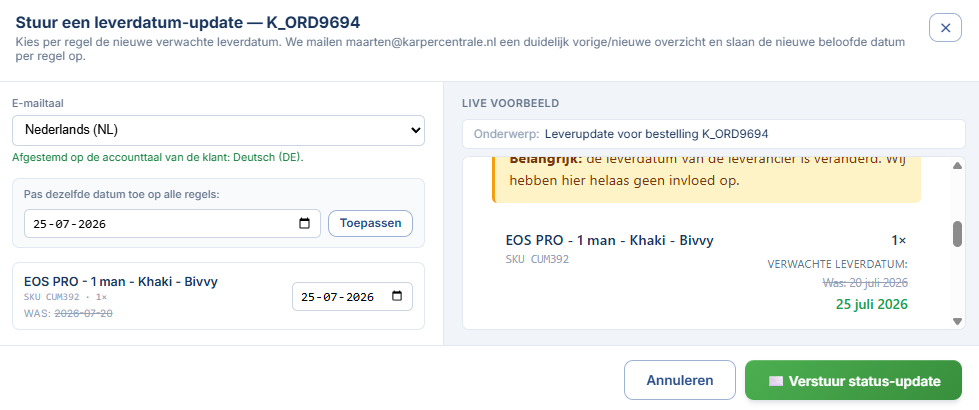
Date changed? Email the customer in one click
Adjust the expected delivery date and automatically send a clean update in the customer’s own language.
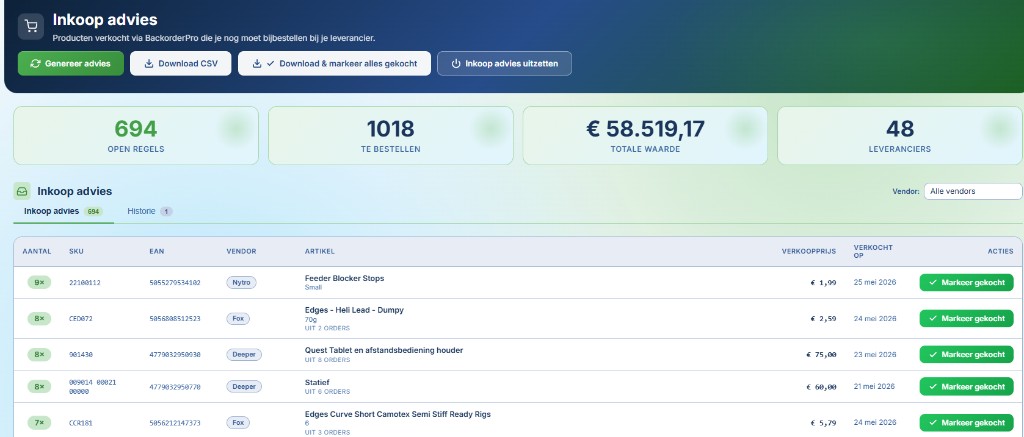
Buy Advice: know what to reorder
BackorderPRO bundles everything already sold but not yet received into a shopping list per supplier — check off and export.
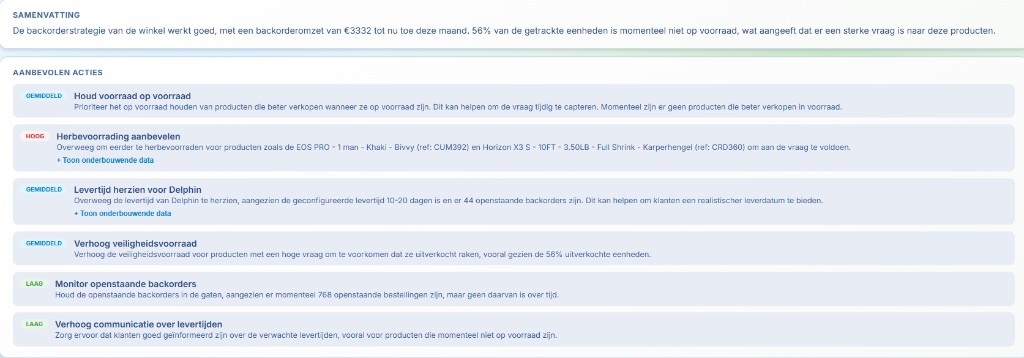
AI advice for smooth handling
Depending on your plan, BackorderPRO summarises demand and suggests concrete actions — what to restock, where to revise lead times and which backorders to watch.
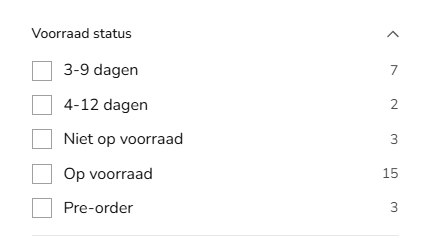
Delivery times as a Shopify filter
Delivery statuses become metafields, so you can use them as a filter in Search & Discovery.
What it gets you
Not technical features, but what it concretely means for your store:
Keep selling without stock
The pre-order button captures revenue you would otherwise lose on an out-of-stock product.
Fewer customer questions
Delivery times and automatic emails answer “when will it arrive?” before the customer has to ask.
Hours less manual work
Feed import and daily sync replace updating stock and delivery times by hand.
Smarter purchasing
Backorder Tracker, Buy Advice and AI analysis show what to reorder — and when.
Ready to stop missing sales?
Install NowEverything you need
For your customer on the storefront and for you behind the scenes.
On your storefront
What your customer sees
- Lead-time badge on the product page (e.g. “Delivery in 5–8 days”)
- Expected-stock message with the exact restock date
- Pre-order button with custom text, colours and action (add to cart / notify me / custom URL)
- Badge on collection cards and in the cart drawer too
- Customer Account widget with backorder/delivery status (on every plan)
- All copy translatable via Shopify Translate & Adapt
Automation
Behind the scenes
- Feeds in CSV, Excel or XML — via URL, FTP/SFTP or JS-rendered sites
- Match on SKU or EAN/barcode, tolerant of spaces and leading zeros
- Rule engine: feed rules + global rules as a safety net
- Lead times (min/max) global and per supplier
- Pre-order rules: min price, max lead time, per-supplier overrides
- Daily scheduled sync + manual “Run Now”
Insight & purchasing
Control over your backorders
- Backorder Tracker: open backorders per order, status, snooze/resolve, CSV
- Buy Advice: automatic shopping list per supplier, check off & export
- Email notifications in 11 languages, with custom domain & branding
- AI Inventory Analysis: revenue and stock insight + reorder advice
- Backorder analytics: revenue, top products, retention per plan
- Works with Search & Discovery for stock filters
How it works
In four steps from feed to fully automated backorder handling.
Configure feed
Upload or link your supplier feed (CSV, Excel, XML; via URL, FTP/SFTP or JS site).
Map columns
Connect SKU/EAN, stock and delivery date to your Shopify products.
Set rules
Define when backorder and pre-order become active.
Automate
Schedule a daily sync (or run manually) and let it run.
Secure, EU-hosted and GDPR-proof
BackorderPRO only touches the product data needed to update your stock — and runs entirely within the EU.
Data in the EU
Hosted in the Fly.io Amsterdam region. Your data never leaves Europe.
Only what is needed
Variant metafields in the snoek_bpo namespace. No customer names, phone numbers or addresses for storefront features.
Stored encrypted
Supplier credentials (FTP, login) and customer emails are encrypted with AES-256-GCM.
GDPR webhooks & retention
Handles customers/redact, data_request and shop/redact. Configurable retention (3–24 months), delete everything any time.
No unnecessary data, no external detours — privacy by design.
“We already carry a substantial stock, yet we wanted to roll out and test the backorder principle further. To this day we sell around 15% extra through BackorderPRO. The communication line and insights the app provides keep customer questions lower than with traditional methods. The app is also easy to connect to our suppliers, so we always use their data. Built for our business, now to share with the world.”
Start with BackorderPRO today
Free plan available, no credit card required.
Install in minutes, connect your first feed and let BackorderPRO manage delivery times, pre-orders and backorders automatically.